FluentFlyout Background

Changelog

The latest updates and changes to FluentFlyout

Latest Release
Minor Update

Update v2.9.2 - Hotfix Update 2

📝 Changelog

  • Fixed flyouts not appearing or displaying behind other windows unless you click/focus on the taskbar for some users — this update should fix it for sure this time. Sorry for the inconvenience! (And thanks to @syswalker for helping me test the fix)
  • Fixed taskbar visualizer not resuming after locking PC and audio device changing (and improved visualizer error logging)
  • Full Changelog: https://github.com/unchihugo/FluentFlyout/compare/v2.9.1...v2.9.2

❤️ Code Contributors

@3rm-z, @unchihugo on GitHub

📦 Free Downloads

Minor Update

Update v2.9.1 - Hotfix Update

📝 Changelog

  • Attempt to fix flyouts not appearing when you'd expect them to appear for some users. I'm sorry for all the users affected by this issue!
  • Attempt to fix flyouts showing behind currently active windows for some users.
  • The "Click to open Media Flyout when media is Present" option in Settings > Taskbar Widget will now show the media flyout regardless of whether the Media Flyout is enabled or not.
  • Full Changelog: https://github.com/unchihugo/FluentFlyout/compare/v2.9.0...v2.9.1

❤️ Code Contributors

@mak7im01, @unchihugo on GitHub

Major Update

Update v2.9.0 - Logo Refresh, Use Album as Accent Color & More!

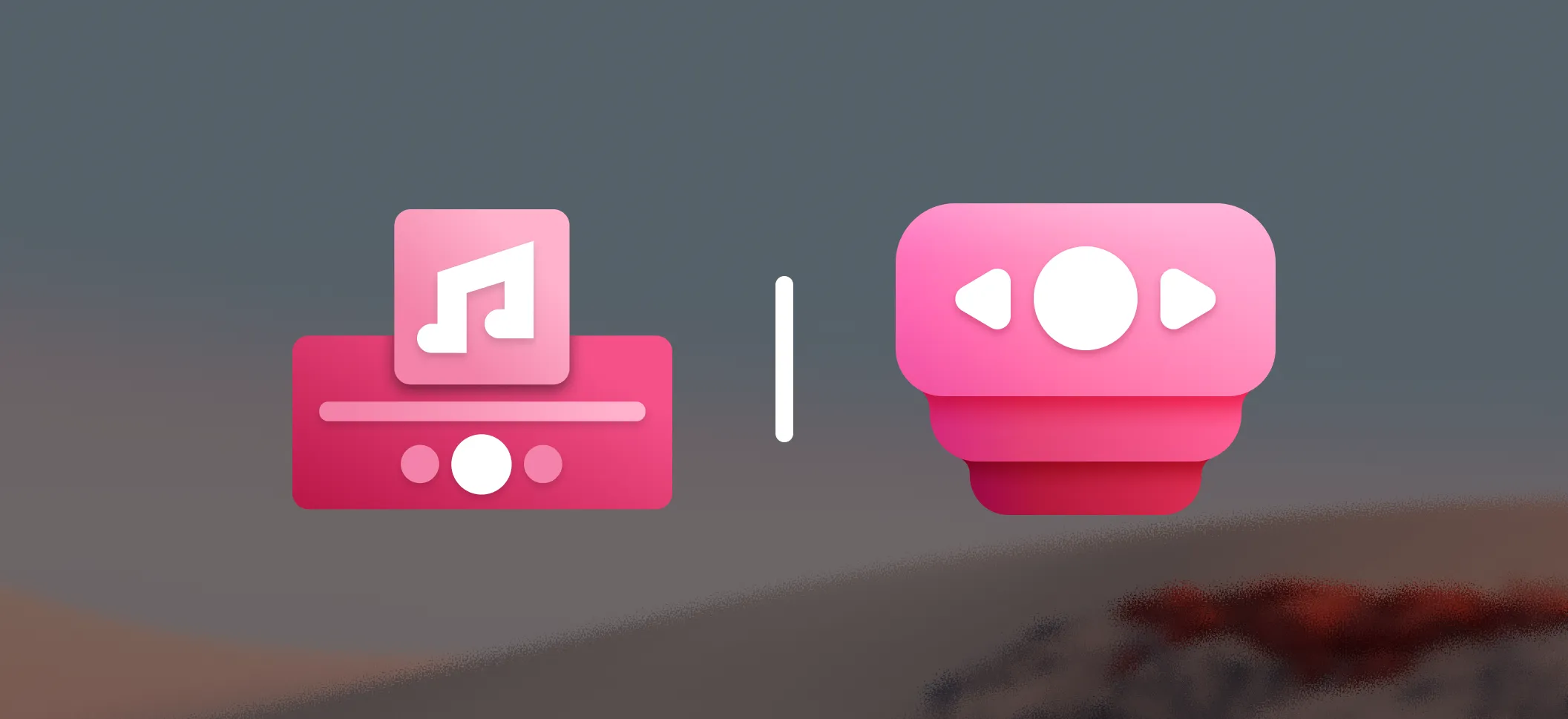
old and new logo compared

This update introduces lots of new features, like matching UI elements to the album cover colors! We also have a new, refreshed icon for FluentFlyout! (read more here) 🎉 Thanks to everyone for your continued support and feedback <3

📝 Changelog

New settings:

  • 🎨 Use Album as Accent Color — Added a new option to use the dominant color of the current album art as the accent color for certain UI elements like the Taskbar Visualizer and the Media Flyout's play/pause button, in Settings > System.
  • 🖥️ Lock Keys Target Monitor Selection — Added options to choose which monitor to display the Lock Keys flyout on; including options to show it on the monitor with the mouse cursor or active window, in Settings > Lock Keys Flyout.
  • 🖱️ Visualizer Click Action — Added an option in Settings > Taskbar Visualizer to directly open the Visualizer settings page when clicking the Taskbar Visualizer.
  • ⚙️ Advanced Settings & Legacy Taskbar Positioning — Added a new Settings > System > Advanced Settings page and introduced a setting to use legacy taskbar width calculation. This allows for better compatibility when using taskbar mods like WindHawk or Start11.

Other updates:

  • Updated FluentFlyout icon in settings, tray and throughout the app to use the new, refreshed icon.
  • Improved the reliability of media flyout triggers by updating how it detects media/volume key presses. This fixes issues where the Media Flyout wouldn't pop up for media keys on some machines.
  • Optimized and improved media flyout and taskbar widget performance by optimizing thumbnail updates.
  • Updated taskbar widget theming to accurately match the Windows system theme instead of the app theme to prevent mismatched theming issues.
  • Premium labels are now colored with the Windows accent color.
  • Fixed a bug where the Taskbar Visualizer would freeze after changing audio input/output devices if the device wasn't properly initialized by Windows
  • Fixed an issue where settings were lost after shutting down or safely quitting the app by ensuring settings are saved during the cleanup process
  • Updated the app and README with the new FluentFlyout logo and branding
  • Added Russian translation to the FluentFlyout README
  • Updated the contributors list in Settings > About and ordered the translator list alphabetically
  • Updated translations of 11 languages (thanks to @3mr9 @FenrirXVII @TranMC @Self4215 @junior0liveira @xsm2 @naturbrilian @D4NA-DANA @mak7im01 @MiguelC221 @Benoit-V @hartelex @oski165 ❤️)
  • Other bug fixes and changes

Code optimizations:

❤️ Code Contributors

@Hikaru11747, @mak7im01, @unchihugo, @weblate on GitHub

Major Update

Update v2.8.0 - New Features, QoL changes & Fixes!

❤️ I'd like to thank every contributor for their work on improving FluentFlyout — I really appreciate it, and it's because of you that we've reached the 100K+ installs milestone! 🎉

📝 Changelog

New settings:

  • 🔊 Audio Visualizer Peak Threshold — Added a new option in Settings > Taskbar Visualizer to adjust how loud audio must be for the bars to reach their maximum height. If you tend to play media loudly or softly, you can try adjusting this setting.
  • ⚙️ Close Flyout on Second Click — Added an option to close the Media Flyout when clicking the Taskbar Widget while it's displayed, available in Settings > Taskbar Widget > Close Flyout on Second Click
  • 💾 Import/Export Settings — Added Import/Export functionality for settings and configurations in Settings > System
  • ⚙️ Taskbar Widget Media Buttons Position — Added a setting to display the media buttons on the left or right in the Taskbar Widget

Other updates:

  • Improved compatibility with other third-party apps that modify how the taskbar works like WindHawk and ExplorerPatcher by improving taskbar widgets handling
  • Improved the way displays are ordered when selecting target displays in settings. This should improve reliability when selecting different monitors, though you might have to re-select the correct monitors as they might be re-ordered.
  • Target displays will now also show their name in settings to help with selection.
  • Slightly changed the background of the settings window UI to match Windows more closely.
  • Improved padding between the Taskbar Widget and Taskbar Visualizer
  • Fixed Lock Keys Flyout being too narrow and cutting off text on unsupported languages
  • Fixed issue where if audio is stopped, bars will remain displayed and paused on the Taskbar Visualizer.
  • Fixed "View logs" button in settings not opening the logs folder
  • Update to .NET 10 for slight performance improvements
  • Update translations of over 18 languages (Thanks to @Xshadow9 @mak7im01 @oski165 @junior0liveira @FenrirXVII @xsm2 @qlintenFX @hayiamzhengxum @reindex-ot @VolodymyrBryzh @nath89-52 @universeitde @soumilnegi154 @D4NA-DANA @Pigeon0v0 @belawastaken @weiss-rn @3mr9 @muratotar7 @Self4215 @prakashgd @rknastenka @TranMC and others on Weblate ❤️)
  • Other bug fixes and changes
  • Full Changelog: https://github.com/unchihugo/FluentFlyout/compare/v2.7.2...v2.8.0

❤️ Code Contributors

@DmitriySalnikov, @FaroJoaoFaro, @Hikaru11747, @mak7im01, @unchihugo, @weblate on GitHub
Minor Update

Update v2.7.2 - Taskbar Visualizer Updates

📝 Changelog

  • 🎛️ Fixed Taskbar Visualizer not adapting to output device changes, resulting in having to restart the program to get the visualizer capturing audio again. Also added additional information and a way to change listening output device in Settings > Visualizer.
  • ⭐ Fixed Taskbar Visualizer not respecting the bars amount option on startup
  • Fixed Taskbar Visualizer bars' corners not correctly rounding with smaller bars
  • Fixed 'Open Logs' incorrectly pointing to the Documents folder on Microsoft Store versions
  • Improved update version check
  • Full Changelog: https://github.com/unchihugo/FluentFlyout/compare/v2.7.1...v2.7.2

❤️ Code Contributors

@unchihugo on GitHub