FluentFlyout Background

Changelog

The latest updates and changes to FluentFlyout

Major Update

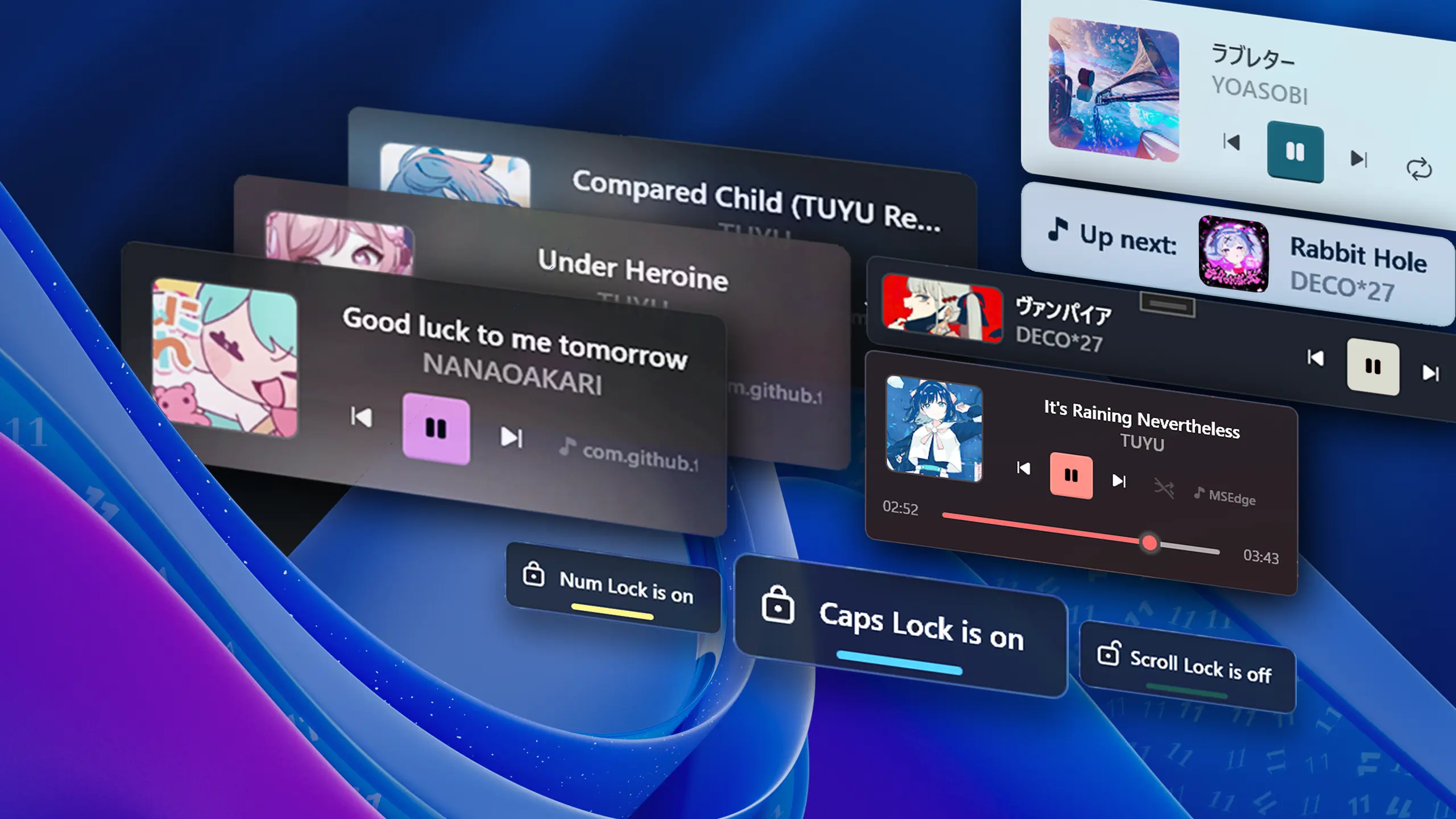
Update v2.4 - Taskbar Widget Buttons & More

image

📝 Changelog

Taskbar Widget updates:

  • ⏯️ Added a new setting to enable new Taskbar Widget Media Controls buttons
  • 🎨 Added a new setting to enable new subtle animations when a new song shows up
  • The Taskbar Widget will now automatically align next to the native widget if the setting is enabled, enabling support for left-aligned taskbars
  • If the artist name is empty, the title text will now be centered
  • Improved cover alignment
  • Other improvements and optimizations to the widget

Other updates:

  • Added debug/error logging to %AppData%\FluentFlyout\
  • 🎉 Windows 10 compatibility — FluentFlyout will now fully work on Windows 10, expect less visual issues (updated MicaWPF package version to 6.3.2)
  • Updated settings window UI
  • Attempted to fix text overlap issues on the Lock Keys flyouts
  • Updated translations (thanks to @genotypePL, @maksymser, @ysfemreAlbyrk, @Xshadow9, @CC-D-Y, @weiss-rn, @logounet, @Pigeon0v0, @Aris-Offline, @Ste3798, @Nikolai-Misha, @xsm2 and others on Weblate!)
  • Full Changelog: https://github.com/unchihugo/FluentFlyout/compare/2.3.5...v2.4.0

❤️ Code Contributors

@Simnico99, @unchihugo on GitHub

Minor Update

Update v2.3.5 - Taskbar Widget Positioning!

📝 Changelog

  • 🛠️ Taskbar Widget position options: Choose to align the new taskbar widget to the left (default), center or right (next to the tray icon)!
  • 🚀 Media Flyout performance updates: No more lag after rapidly pressing media keys!
  • Fixed issue where the "Launch on Startup" setting would always be switched off
  • Update translations from Hosted Weblate (thanks to @se34k, @CielWhitefox, @thinkii, @v3vishal, @yoyo435, @ThePerson-o, @fortIItude, @xsm2, @weiss-rn and everyone else on Weblate)
  • Refactor licensing for Microsoft Store version
  • Full Changelog: https://github.com/unchihugo/FluentFlyout/compare/v2.3.0...2.3.5

v2.3.6:

❤️ Code Contributors

@unchihugo, @weblate on GitHub

Major Update

Update v2.3 - Windows Taskbar Widget!

FluentFlyoutDemo9

📝 Changelog

  • Media Flyout Taskbar Integration: A compact, built-in widget that lives right on your Windows Taskbar for instant access to your media, with customization options!
  • 📥 Hide Tray Icon option: you can now choose to hide the Tray Icon completely!
  • Fix Media Player Info sometimes displaying Windows Explorer,
  • Pressing the start menu entry (or launching FluentFlyout) a second time will now open settings
  • Add Premium support for Windows Store (still completely free on GitHub)
  • Update translations from Hosted Weblate (thanks to everyone on Weblate),
  • Full Changelog: https://github.com/unchihugo/FluentFlyout/compare/v2.2.0...v2.3.0

❤️ Code Contributors

@kitUIN, @unchihugo, @weblate on GitHub

Major Update

Update v2.2 - QoL and Performance updates

📝 Changelog

  • 🎨 The seek bar on the Media Flyout is now properly accent-colored instead of grey on the progressed side!
  • 💾 Media Flyout now caches the media player name and icon instead of searching on every flyout—you might notice improved performance
  • Added 5 new languages (Arabic, Traditional Chinese, Czech, French, German)
  • Right-to-left languages will now change every window and flyout's UI to follow right-to-left design
  • Update translations from Hosted Weblate (Thanks to @LOGYT-Eberk, @xsm2, @nath89-52, @tnhung2011, @ebraheemelteyb, @Atalanttore, @bropines, @Nikolai-Misha, @CC-D-Y, @Pigeon0v0 and others on Weblate!)
  • Updated READMEs
  • Other bug fixes
  • By @unchihugo
  • Full Changelog: https://github.com/unchihugo/FluentFlyout/compare/v2.1.0...v2.2.0
Major Update

Update v2.1 - Always Display, Player Icons and Names & more Acrylic!

📝 Changelog

  • 📌 Always Display Widget — pin the Media Flyout to your desktop at all times with this new toggle, and dismiss it with a new close button!
  • ✒️ Media Flyout now displays the proper app icon and name from the media player (e.g. Spotify will now display the Spotify icon and name instead of "spotifyab")!
  • 🎨 Added Acrylic Blur toggles to "Next Up" and Lock Keys flyouts so you can have the new look on all flyouts!
  • Added fallback to Chinese and Japanese fonts (MS YaHei and MS JhengHei) to improve appearance and CJK character support
  • Fixed flyout mouse hover issue
  • Settings will now be shown to new users on first launch
  • Update translations from Hosted Weblate (Thanks to @tnhung2011, @Nikolai-Misha, @bropines, @LOGYT-Eberk, @Y-PLONI, @xsm2, @gustavo-bozzano, @ysfemreAlbyrk and others on Weblate!)
  • More bug fixes
  • By @unchihugo
  • Full Changelog: https://github.com/unchihugo/FluentFlyout/compare/v2.0.0...v2.1.0

👏 New Contributors

❤️ Code Contributors

@kitUIN on GitHub